
WFInfo is a companion app for Warframe, based on the original which is no being longer developed. WFinfo is designed to provide quick access to both Platinum and Ducat prices for all fissure rewards to make selecting the best reward easy.
WFInfo does this by screenshotting the game window, cropping out the part text, then passing it to an Optical Character Recognition Engine, specifically Google's Tesseract. The OCR Engine will then send back the text it found, and we will pull out the part name from that text. From there, we display the stats for each part in an overlay or on a separate window.
本分支的 OpenClaw 配套发行版使用独立版本与更新通道;请从 FFangx/WFinfo releases 安装。它基于 Apache-2.0 的 WFCD/WFinfo,保留上游归属并在发布包中携带许可证与第三方说明。不要用上游原版覆盖,否则下述 OpenClaw 策略与全 Prime 索引联动将不可用。
本分支把界面语言与游戏/OCR 语言分开,核心奖励覆盖层、奖励窗口和设置入口可使用简体中文,同时保留英文界面。设置中的“开奖决策”提供两种模式:
- 普通估值:保留 WFInfo 原有的白金、杜卡德、成交量和最高值高亮。
- 奸商目标:读取
%APPDATA%\WFInfo\ducat_strategy.json,对同一次开奖的最高杜卡德与最高白金奖励计算Dmax / Pmax,再与 OpenClaw 提供的商品保本线比较,直接在游戏覆盖层标出“保留白金”或“兑换杜卡德”。
商品模式不会混用 WFInfo 的 48 小时均价与外部成交中位。只有策略未过期、且当前所有奖励均存在同一口径的可靠估值时才给选择;否则仅展示识别信息。它仍然使用屏幕 OCR,不读取奖励内存或网络封包。
若策略内缺少某一奖励的估值,WFInfo 会读取同目录的标准 prime_reward_prices.json(由 OpenClaw 索引生成器从全量遗物奖励表中筛出英文规范名含独立单词 Prime 的可交易奖励、排除 Forma/Requiem 等,并与可靠成交统计预热)补缺,策略内价格始终优先。索引的 schema、时间与字段会被严格校验:缺失、损坏、过期、generatedAt 明显晚于当前时间(允许最多 5 分钟时钟偏差)或全部条目无效时整体忽略;条目级无效价格(platinum 非有限正数、basis 非今日/90 日口径、成交量非有限或为负)逐项跳过,并维持原有的“缺价不下结论”安全停判;索引有效期也不会超出策略本身的有效期。
奸商目标模式在四张奖励卡下方使用一条横跨全部奖励的全局决策框,说明“拿最高杜卡德奖励会放弃哪个白金奖励”,并给出对应商品的直白结论。单张奖励卡继续显示库存/组装需求、精通、入库、白金估值、杜卡德和成交量;当局最高白金数字使用青色、最高杜卡德数字使用金色,绿色只表示最终推荐。库存只陈述“库存 X · 需 Y”,不会把库存不足推断成成品未拥有。
普通估值与奸商目标共用同一套半透明奖励卡视觉体系。普通模式只显示基础估值和极值提示;奸商目标模式在其上增加推荐边框、短标签和全局决策框,不维护独立的卡片皮肤。离线检查可使用 WFInfo.exe --reward-preview <input.png> <output.png> [breakEven] [normal|baro] 分别渲染两种模式。
- OpenClaw users download the companion release; upstream-only users may continue to use WFCD/WFinfo.
- WFinfo requires some aditional software to function properly:
- Download BOTH Microsoft Visual C++ Redistributable 2019 from Microsoft x64 and x86. Make sure you have BOTH installed or it will not work.
- For Windows 7 users: Enable TLS in registry and ensure you have installed .NET Framework Runtime 4.8
- Run WFInfo.exe and wait for it to complete the initial load (databases + OCR data)
- Go into warframe game and set the displaymode to
Borderless Fullscreenand under interface turnItem Lableson. - Press the hotkey
print screenon a fissure reward screen to show the display, or simply wait if you use the auto feature - When the program does not seem to function, do not spam the hotkey. This will create un-nessesary noise that will make debugging more difficult
DE[Aidan] has confirmed in a forum post that this will not ban you.

Reference:
(However, he is now retired member, and no longer part of DE)
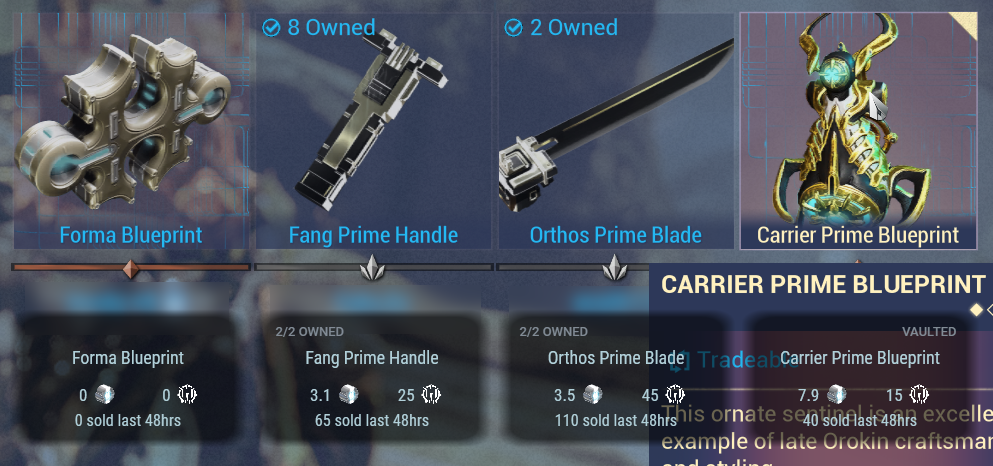
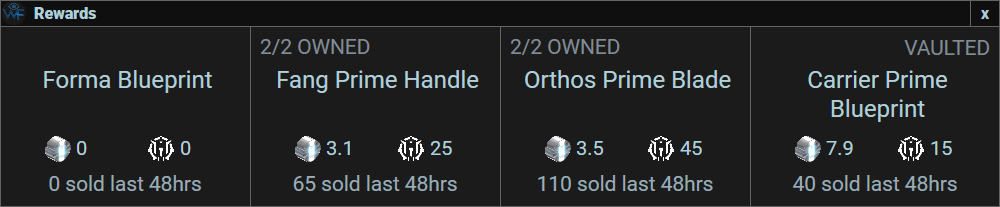
When WFInfo displays the part information, through an overlay or a separate window, a large selection of data is displayed.
Here's a quick highlight of the information shown:
- Owned count (based on the Equipment Window)
- Vaulted tag (shows up if the part is vaulted)
- Part name (use this to confirm no errors occured)
- Plat Value (based on average prices on warframe.market)
- Ducat Value
- Volume Sold (amount of parts sold in the last 48 hours on warframe.market)
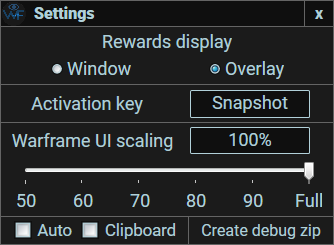
- Auto Mode
- When enabled, this listens for Warframe's reward-screen log events. It uses the low-latency Windows debug channel when available and falls back to incrementally tailing EE.log when another application already owns that channel. Current and legacy reward event messages are supported. Once an event is detected, it triggers the display function and brings up your overlay/window with the reward info.
- If it can't detect the reward screen within 5 seconds, then it will assume an error happened.
- If it doesn't display, you can just hit the key and force it to activate.

- Clipboard Copy
- When enabled, WFInfo will copy the plat prices and the part names into the clipboard so you can just paste them into Warframe's Chat for your party-mates.
- This does attempt to link the parts themselves so that it's easier to see.

- Auto Update!
- During the initial load of WFInfo, it will query our site to check for any updates available.
- If any are found, it will display the prompt above and you can let it download and update WFInfo for you!
- We're currently working on slimming the download file down, so you don't have to worry about a massive download with every update. Current estimates are in the range of 15MB.

The Relics panel allows you to look at all relics and see statistics for each. We show basic info such as whether a relic is vaulted and the relic's rewards and the rarities of those rewards, and we have three complex statistics for every relic:
- The average platinum price of an Intact relic's rewards, which are based on drop chance.
- The average platinum price of a Radiant relic's rewards, which are as well.
- The difference between the two above values, which can be used to find which relics will give you more plat, on average, when refined.
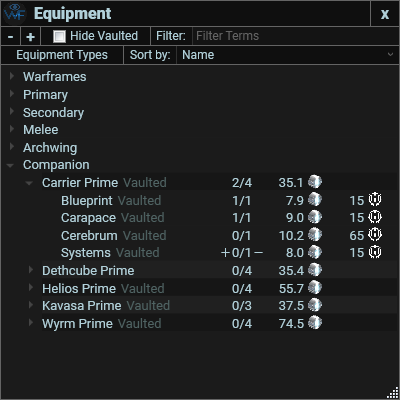
The Equipment window allows you to look at each prime equipment and its parts. It shows how much each costs currently on warframe.market, and also shows how much it will cost to purchase a whole set of equipment.
If you mark an item here, it will show up during a fissure reward screen.
Note: For both of these info panels, there are several sorting options that allow you to find what is best for you. Also they have grouping features that allow you to see and sort all relics, or to only sort from one era, i.e. Lith.
When looking at your Prime inventory, you can scan it to see how many plats, ducats or even plats/ducats is worth each items, really usefull for baro's ducats, or just take a quick look at what items you can sell on WFM. The scanned items list can even be exported to a CSV file, allowing you to see them from a different angle and maths.
Manage your Warframe.Market online status automatically by detecting if your game is running or by detecting your AFK status. Search for specific items on the go with the press of 2 keys, you even can add them to your listings without quitting your game. List your choosen prime rewards at the end of your mission by clicking the "Confirm Listing" buttons, even for multiple items. If you really like this software, you even can post a review on the devs profile by the press of one button !
Kekasi: u/RandomFacades (Reddit), Kekasi (Warframe), Kek#5390 (Discord)
Dapal-003: u/Dapal-003 (Reddit), Dapal003 (Warframe), ダパール・Dapal-003#0695 (Discord)
Dimon222: u/dimon222 (Reddit), dimon222 (Warframe), dimon222#8256 (Discord)
Discord: https://discord.gg/qfd3eFb
Website: https://wfinfo.warframestat.us/