


Design your agent team on a canvas, watch them work, and edit right there.
See your AI agents think.




Coding agents don't type. They act — reading files, running commands, spawning other agents. Yet the tools we watch them with are still text: a terminal, a chat log, a list of tasks.
| Who writes the code | What you do | Examples | |
|---|---|---|---|
| IDE | You | Type it | VS Code, Cursor |
| ADE | The agent | Read the terminal | Warp |
| VDE | The agents | Watch the map | Vibisual |
A Visual Development Environment draws agent work as space instead of text — and keeps design, execution, observation, and editing on that one surface.
Claude Code hook events — including PreToolUse, PostToolUse,
UserPromptSubmit, and SessionStart — become nodes on a live
canvas. Sub-agent spawns become edges. Tool calls become child
bubbles. Folders and files light up as they are touched.
The output of a multi-agent session is a tree printed as a wall of text. Vibisual draws that tree as it grows.
The bubble map is both the runtime view and the design surface for
your harness. Instead of editing settings.json in a text editor, you
build the harness on a canvas:
- Place agents as nodes. Drop a bubble onto the canvas to define a new sub-agent. Each node carries its own configuration — model, permission mode, tools, isolation, max turns, effort level, skills, and per-agent rules.
- Wire them with edges. Connect agents with task edges to define handoffs and dependencies between them. The edges become the control-flow graph of your harness.
- The graph defines the harness. In the current early release, Vibisual reads the graph and launches the corresponding Claude Code sub-agent workflow. The same canvas you designed on is the canvas you watch the run on.
What used to be a buried settings.json tree is now a workflow you can
see, edit, and rearrange at any time.
Double-click a bubble and the workspace opens in place: the agent's live stream, a file tree, a code editor with syntax highlighting, diffs, and a terminal — all in the same window as the canvas.
You direct, the agents build, and when something needs a human hand you fix it on the spot instead of switching to another app.
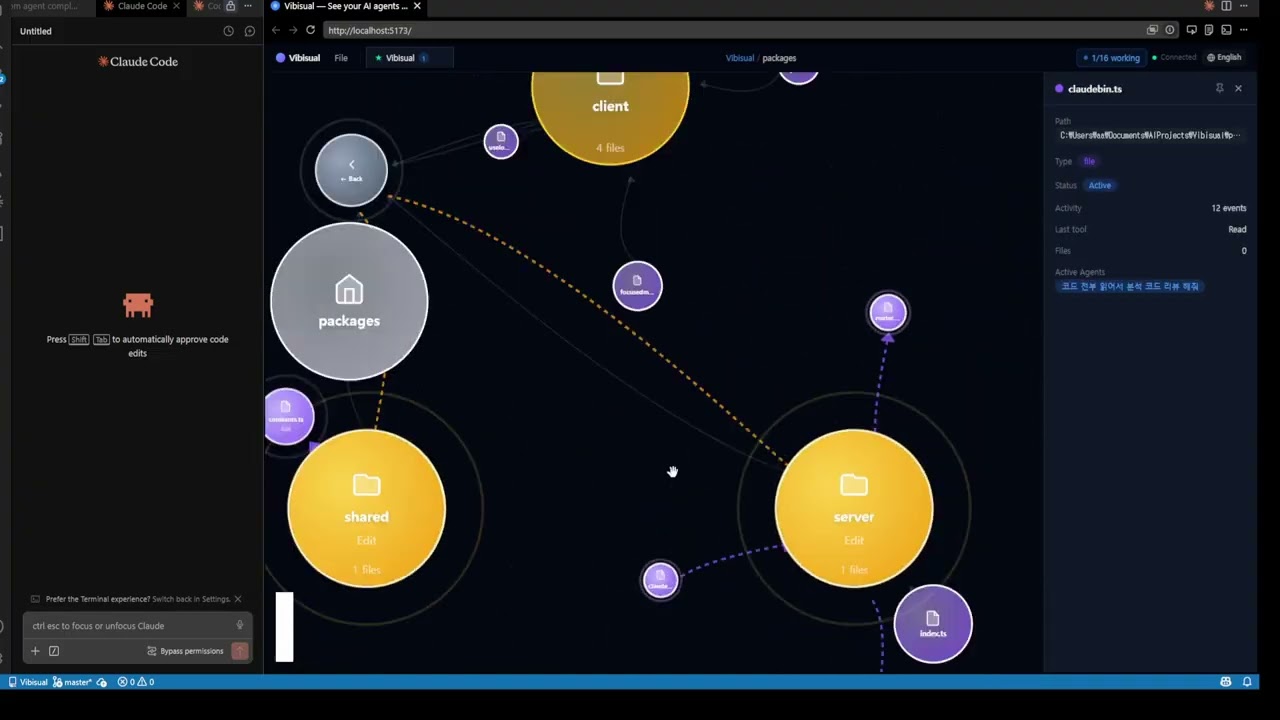
▶ Watch on YouTube — 2-minute walkthrough
Vibisual runs on top of the Claude CLI, which must already be installed and available on your PATH.
-
Download the latest installer from the Releases page and run it:
Vibisual-0.1.9-setup.exe -
Launch Vibisual.
git clone https://github.com/Vibisual/vibisual.git
cd vibisual
pnpm install

# Build and launch the desktop app
node scripts/runapp.mjs

# Build a Windows installer
pnpm build:winOn first launch, Vibisual writes a managed hook block into
~/.claude/settings.json so Claude CLI sessions can stream into the
bubble map. A timestamped backup is kept next to it
(.bak-vibisual-*). If you'd rather wire hooks yourself, set
VIBISUAL_SKIP_HOOK_INSTALL=1 before first launch.
Tested on Windows. macOS and Linux builds are available but not extensively tested.
Vibisual is currently an early preview release.
This 0.1.x preview is intended for experimentation, demos, and feedback. Expect bugs, incomplete features, rough edges, and occasional breaking changes.
Vibisual is not recommended for critical production workflows or repositories containing highly sensitive data.
Vibisual uses Claude Code hooks to visualize agent activity. Hook payloads may include prompts, tool calls, file paths, shell commands, session metadata, and other local development context.
Vibisual is currently intended for local experimentation. Review the generated hook configuration before use, especially in repositories containing secrets, credentials, private code, customer data, or production systems.
Claude Code command hooks run with the permissions of your local user account. Only install and run hooks from code you trust.
Apache License 2.0 — see LICENSE. "Vibisual" and the Vibisual logo are trademarks of the project maintainers; see TRADEMARK.md for the policy.
By contributing, you agree to the DCO sign-off requirement and the additional contribution terms described in CONTRIBUTING.md, including permission for project maintainers to relicense contributions for future commercial offerings.
Vibisual is an independent open-source project and is not affiliated with, endorsed by, or sponsored by Anthropic.
Claude, Claude Code, and Anthropic are trademarks or registered trademarks of Anthropic, PBC. All product names, logos, and brands are property of their respective owners.