

Autotaggerr is an automated music tagging utility that enriches your Lidarr managed audio library with detailed metadata from MusicBrainz. It identifies tracks based on their MusicBrainz Release ID (used by tools like Lidarr), or by talking to Lidarr through API. it then fills in missing metadata, including: track artists, release date, genre, track numbers, and more. It can automatically refresh the metadata in Plex afterward.
Warning
There is currently no official release of this software, it is in beta and has not been advertised. Get in contact with me if you are interested in it.
This tool is for a specific niche, but feel free to use it if it fits your use case. I use PlexAmp as a music player, and Lidarr as a music catalog tool. Lidarr its job well for the most part, except for the metadata. They do not tag all the data available from Musicbrainz, and based on my dialogue with them, they have no intention of fixing this. Solution: I'll tag the files myself.
PlexAmp/Plex is a lot smoother with good metadata attached. Lidarr already selected a Musicbrainz release when it imported the music, I just need to apply all the data from that source. Here is the desired result within PlexAmp, notice the featuring artists:
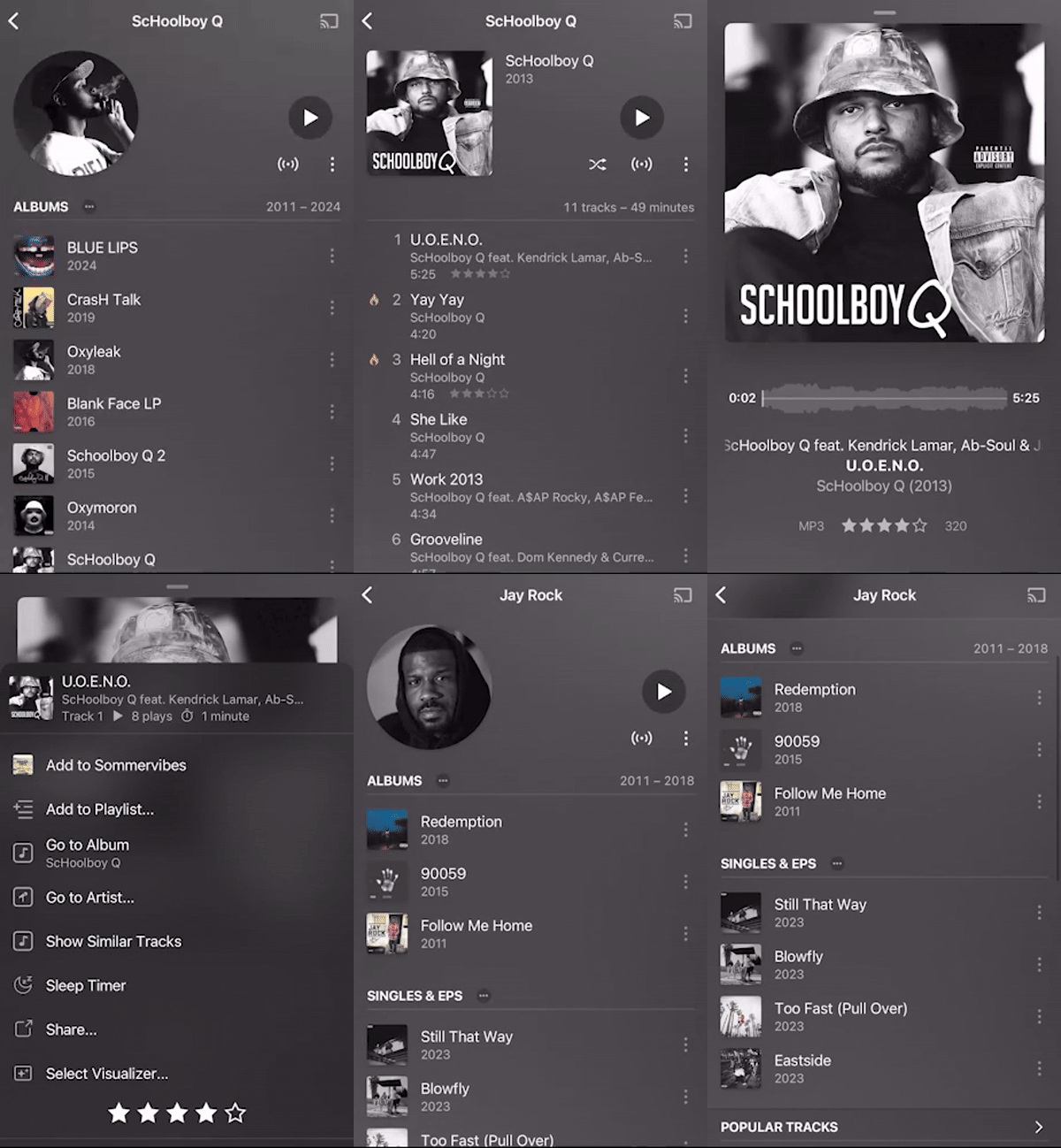
There are other solutions that try to fix this, like a Beets plugin that can run on top of Lidarr. I found this solution very confusing to set up, and it seemed to rely on auto-matching track titles, which I did not like. I already know the Musicbrainz release chosen.
-
📂 Recursive Library Scanning
Traverse your music directories and find FLAC and MP3 files automatically. -
🧠 MusicBrainz Integration
Uses the MusicBrainz API to fetch detailed metadata using release IDs already embedded in your files (via Lidarr, etc). -
🏷️ FLAC + MP3 Tagging
Updates:- FLAC via
metaflac - MP3 natively, no external tool required
- FLAC via
-
🖼️ Album & Artist Artwork
Covers come from the Cover Art Archive with no setup at all. For artist portraits and backdrops, add a fanart.tv data source with your own free API key — MusicBrainz has no artist images, so that is the only source for them. Without a key, artists simply show monogram tiles. All artwork is proxied and cached by Autotaggerr, so nothing is hot-linked and your key never reaches the browser. -
🧠 Rate-Limited & Cached API Calls
Avoid API abuse and repeated lookups with built-in caching and configurable request throttling. -
🐳 Containerized (Docker-ready)
Small, clean and minimal Docker image withmetaflacincluded.
- Scans your music library (recursively).
- Extracts the MusicBrainz Release ID from FLAC/MP3 files. Can fall back to Lidarr API.
- Queries MusicBrainz to retrieve release data.
- Writes metadata tags to files:
- FLAC → via
metaflac - MP3 → natively
- FLAC → via
- Optionally logs and caches results to avoid re-fetching metadata.
- Optionally informs Plex to refresh the metadata
- Plex does not support multi-artist albums, and renders a joined string as one artist literally named
A; B. SoALBUMARTISTgets the primary artist only; the full credit is written alongside it asALBUMARTISTS, which players that understand it (Navidrome, Picard) read instead. The same applies to genres on MP3: Plex reads tags through ffmpeg, which sees only the first value of a proper multi-value tag, so MP3s join them with;unless the tagger profile'smp3_multi_value_tagsis on. FLAC always uses the multi-value form — ffmpeg joins those back together on its own, so nothing is lost either way. - Autotaggerr can at times utilize the path of the file to determine what metadata is correct. Therefore, you must use this structure
/music-library-root/[ARTIST]/[ALBUM] ([YEAR])/[OPTIONAL MEDIA FOLDER]/[TRACKS]) - Autotaggerr will first look for the Musicbrainz release/track ID within the file tags. If none are found, a Lidarr client must be configured for fallback. This is necessary for MP3 files as Lidarr does not tag these IDs on MP3s
- Lidarr tends to overwrite tags for some reason. Go to Lidarr -> Settings -> Metadata:
- Set
Tag Audio Files with MetadatatoFor new downloads only - Set
Scrub Existing Tagsto unchecked
- Set
- Plex must be set up to respect local metadata:
- Library -> Manage library -> Edit -> Advanced -> Check
Prefer local metadata
- Library -> Manage library -> Edit -> Advanced -> Check
- Jellyfin identifies artists by name, not by MusicBrainz ID (which Autotaggerr does tag). If an online provider (e.g. TheAudioDB) spells an artist differently than MusicBrainz — such as a straight
'vs a curly’apostrophe — Jellyfin can show duplicate artists and even bake both spellings intoalbum.nfo. It may therefore be wise to disable theNfometadata reader (and/or TheAudioDB) for your music library so Jellyfin trusts the embedded tags Autotaggerr writes:- Dashboard -> Libraries -> your music library -> uncheck
Nfounder the metadata readers/downloaders
- Dashboard -> Libraries -> your music library -> uncheck
One binary, and only if you're not using Docker:
Used to read/write Vorbis comments in .flac files.
- Windows (choco)
choco install flac - Ubuntu/Debian
sudo apt install flac
MP3 tagging needs nothing installed — ID3 frames are read and written in-process.
fpcalc is optional, for AcoustID fingerprinting.
Autotaggerr runs well as a background service. Here's how to set it up with Docker Compose:
services:
  autotaggerr:
    container_name: autotaggerr-app
    image: ghcr.io/aunefyren/autotaggerr:beta
    restart: unless-stopped
    volumes:
      - ./data/:/app/config/:rw               # Config and cache
      - /media/library/music/:/music/:rw      # Your music library
    environment:
      # These override config.json settings
      PORT: 8080
      TZ: Europe/Paris
      PUID: 1000
PGID: 1000Edit the config.json, found within the config directory. If it isn't there, just start the application first. The keys are written in alphabetical order, and any key this version does not know is dropped the first time it saves the file. Example:
{
	"autotaggerr_artwork_cron_schedule": "0 0 5 * * *",
	"autotaggerr_artwork_disabled": false,
	"autotaggerr_environment": "prod",
	"autotaggerr_event_detail_retention": 500,
	"autotaggerr_event_retention": 200,
	"autotaggerr_external_url": "",
	"autotaggerr_health_cron_schedule": "0 */5 * * * *",
	"autotaggerr_log_level": "info",
	"autotaggerr_migration_review_artists": false,
	"autotaggerr_migration_review_deletions": false,
	"autotaggerr_migration_review_pinned": false,
	"autotaggerr_migration_review_releases": false,
	"autotaggerr_mirror_cron_schedule": "0 0 3 * * *",
	"autotaggerr_mirror_disabled": false,
	"autotaggerr_name": "Autotaggerr",
	"autotaggerr_port": 8080,
	"autotaggerr_process_concurrency": 4,
	"autotaggerr_process_cron_schedule": "0 0 18 * * 7",
	"autotaggerr_test_email": "",
	"autotaggerr_version": "v1.0.0",
	"database": {
		"dsn": "config/autotaggerr.db",
		"type": "sqlite"
	},
	"plex_base_url": "https://plex.mycooldomain.com",
	"plex_token": "XXX",
	"private_key": "",
	"smtp_enabled": true,
	"smtp_from": "",
	"smtp_host": "",
	"smtp_password": "",
	"smtp_port": 0,
	"smtp_tls": "auto",
	"smtp_username": "",
	"timezone": "Europe/Paris"
}Every setting can be defined in config.json. A subset can also be overridden at runtime with a startup flag or an environment variable (the container entrypoint.sh maps env vars onto the flags). Precedence is: startup flag → environment variable → config file value. A flag/env only overrides the config when it is explicitly provided.
You do not have to edit this file by hand. Signed in as an admin, the Settings page edits every key below from the web UI: schedules, log level, processing concurrency and the mirror switch take effect immediately, and the rest are saved and picked up at the next start (the page says which is which). See docs/settings.md.
Music libraries, metadata managers, data sources and tag-writing settings are not in this file —
they are database rows, added and edited on the Libraries, Managers, Data sources and Tagger
profiles pages. config.json used to carry keys that seeded them on the first boot and were ignored
on every boot after; those are gone, and an old file is cleaned of them the first time this version
starts.
| Config file entry | Startup flag | Environment variable | Type | Description |
|---|---|---|---|---|
timezone |
-tz |
TZ |
string | IANA timezone the app runs in. Default Europe/Paris. |
database.type |
— | — | string | Database driver: sqlite (default, pure-Go/CGO-free). postgres/mysql planned. |
database.dsn |
— | — | string | Connection string; for sqlite a file path. Default config/autotaggerr.db. |
private_key |
— | — | string | Auto-generated 64-byte base64 secret (also signs auth tokens). Leave empty; it is created on first start. |
autotaggerr_port |
-port |
port |
int | HTTP port the service listens on. Default 8080. |
autotaggerr_name |
— | — | string | Display name of the instance. Default Autotaggerr. |
autotaggerr_external_url |
-externalurl |
externalurl |
string | URL others use to reach Autotaggerr. Default empty. |
autotaggerr_version |
— | — | string | Build version. Injected at release time; do not set manually. |
autotaggerr_environment |
— | — | string | prod or test. test disables Gin release mode and redirects every outgoing email to autotaggerr_test_email, with no exception. Default prod. |
autotaggerr_test_email |
— | — | string | Default recipient for the Send test message button on Settings → Email, and the sole recipient of every message while autotaggerr_environment is test. Default empty. |
autotaggerr_log_level |
— | — | string | Logrus level (trace, debug, info, warn, error, …). Default info. |
autotaggerr_process_cron_schedule |
— | — | string | 6-field cron for the recurring processing run. Default 0 0 18 * * 7 (Sundays 18:00). |
autotaggerr_process_concurrency |
-concurrency |
concurrency |
int | Number of files processed in parallel per library. 1 = serial. Default 4. |
autotaggerr_mirror_disabled |
— | — | bool | Turn the scheduled MusicBrainz mirror refresh off entirely. Default false (the mirror runs). |
autotaggerr_mirror_cron_schedule |
— | — | string | 6-field cron for the mirror refresh. Default 0 0 3 * * * (nightly 03:00). |
autotaggerr_artwork_disabled |
— | — | bool | Turn the scheduled artwork fetch — and the automatic one for newly added artists and albums — off entirely. Images are still fetched on demand when a page asks. Default false (artwork is fetched ahead). |
autotaggerr_artwork_cron_schedule |
— | — | string | 6-field cron for the artwork fetch. Default 0 0 5 * * * (nightly 05:00). New rows fetch their own artwork as they arrive, so this is a backstop for expiry. |
autotaggerr_migration_review_releases |
— | — | bool | Hold merged releases for manual approval instead of re-pointing records automatically. Default false (apply). |
autotaggerr_migration_review_artists |
— | — | bool | Hold merged artists for manual approval. Default false (apply). |
autotaggerr_migration_review_pinned |
— | — | bool | Hold any migration that would rewrite a manually attached file's MB ID, whatever its type. Default false (apply). |
autotaggerr_migration_review_deletions |
— | — | bool | Hold deleted entities for manual approval. Applying one marks the affected files unmatched. Default false (apply). |
autotaggerr_event_retention |
— | — | int | How many runs the Activity feed keeps. Counted in runs, not rows, so a run's stages are never pruned out from under it. Default 200; 0 or less means the default. |
autotaggerr_event_detail_retention |
— | — | int | How many per-file (or per-entity) detail rows one Activity event stores. Rows past the cap are counted but not kept, so the event still reports "showing 500 of 3120". Raising it on a busy library grows the database noticeably. Default 500; 0 or less means the default. |
smtp_enabled |
-disablesmtp |
disablesmtp |
bool | Enable SMTP mail. The flag/env is inverted: pass true to disable. Default enabled. Used by the Send test message button on Settings → Email; nothing else sends mail yet. |
smtp_host |
-smtphost |
smtphost |
string | SMTP server hostname. Default empty. |
smtp_port |
-smtpport |
smtpport |
int | SMTP server port. Default 0. |
smtp_tls |
— | — | string | How the connection is encrypted: auto (default — implicit TLS on port 465, STARTTLS elsewhere when offered), none, starttls (refuse to send if not offered), implicit. |
smtp_username |
-smtpusername |
smtpusername |
string | SMTP auth username. Empty means no authentication is attempted. Default empty. |
smtp_password |
-smtppassword |
smtppassword |
string | SMTP auth password. Default empty. |
smtp_from |
-smtpfrom |
smtpfrom |
string | Sender address for outgoing mail. Default empty. |
plex_base_url |
— | — | string | Base URL of the Plex instance to refresh. Default empty. Editable on Settings → Plex. |
plex_token |
— | — | string | Plex auth token. Default empty. Editable on Settings → Plex. |
| — | -file |
file |
string | Process a single file, then exit instead of running the service. Runtime-only, not stored in config. |
| — | -fileRoot |
fileRoot |
string | Library root containing the artist folder for -file. Required with -file. Runtime-only. |
| — | — | PUID |
int | Env only. UID the container process runs as. Default 1000. |
| — | — | PGID |
int | Env only. GID the container process runs as. Default 1000. |
Lidarr is not configured here. It used to be, through three
lidarr_*keys that were copied into the Lidarr manager record on the first run and never read again. Those keys are gone: a Lidarr connection is created and edited under Managers in the web UI, which is the only place the credentials live. A stale copy left in an oldconfig.jsonis ignored and can be deleted. The Test button there probes the connection with exactly the credentials a scan would use; an auth-proxy cookie expires on its own schedule, and that button is how you find out it has.
Support for other formats (OGG, M4A, etc)
More metadata
Pull requests, suggestions, and issue reports are welcome! Feel free to fork.