
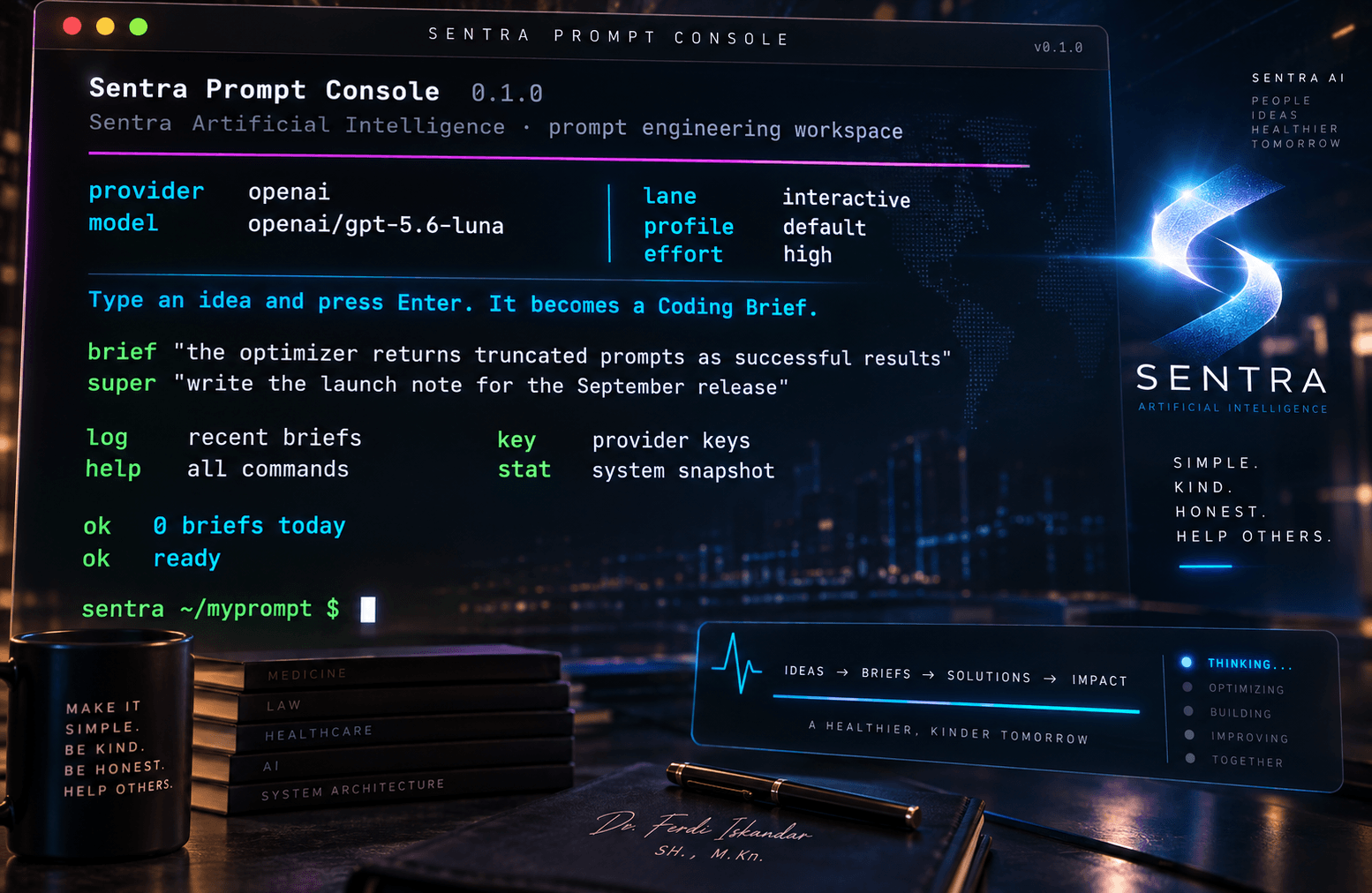
A terminal-native prompt engineering workspace by Sentra Artificial Intelligence.


FILL BY DEFAULT · ASK ONLY TO REFINE


Overview · Quick Start · Coding Brief · Validator · Console · Providers · Architecture · Quality · Known Gaps
Important
MyPrompt is currently a desktop-only Electron application. The renderer is a framework-free, terminal-style console, and all prompt logic runs in the Electron main process. Some legacy Next.js files and dependencies are still in the tree as cleanup candidates, but there is no active Next.js web surface.
Note
This README explains the repository. When it disagrees with the runtime code, validator contracts, project contract, or applicable SAFRS controls, those win.

Ask a coding assistant for a login page and you can spend twenty minutes answering its questions before it writes a single line. MyPrompt flips that order. Its house rule is fill by default, ask only to refine. You type a raw idea, you get back a complete, validated artifact, and questions show up afterward only if something still needs your call.
MyPrompt is a terminal-native prompt engineering workspace built by Sentra Artificial Intelligence. It runs as an Electron desktop app and turns rough intent into one of three things:
RAW IDEA
   │
   ├── brief      → validated Coding Brief
   │
   ├── super      → structured Super Prompt
   │
   └── transform  → deterministic model-specific scaffold
Day to day, the loop is short: type an idea, get a complete artifact, let the validator check it, answer a question or two if anything is still open, then copy, save, evaluate, or rerun. It is built for a single operator preparing briefs for coding agents and structured prompts for language models.

| Field | Current value |
|---|---|
| Product | MyPrompt / Myprompt |
| Package | sentra-prompt |
| Version | 0.1.0 |
| Repository | drferdi/Myprompt |
| Primary surface | Electron desktop console |
| Renderer | Framework-free text console |
| Default prompt outcome | Coding Brief |
| Other outcomes | Super Prompt · deterministic Transform |
| Language model mode | Bring-your-own-provider |
| Node.js | 22 or later |
| Package manager | pnpm@11.21.0 |
| Development model | Standalone SAFRS capsule |
| Governance status | Active capsule · R2 review required before integration or release |
| Creator | Dr. Ferdi Iskandar |
| Organization | Sentra Artificial Intelligence |
The names are related on purpose: the GitHub repository is drferdi/Myprompt,
the npm package is sentra-prompt, the desktop prompt reads
sentra ~/myprompt $, and the product is displayed as MyPrompt.

You'll need Node.js 22 or later, pnpm 11.21.0, and, for now, Windows with
PowerShell for the desktop build scripts. The console opens without a provider
key, but brief, super, and /evaluate need one. A database is only needed
for account-backed features.
git clone https://github.com/drferdi/Myprompt.git
cd Myprompt
pnpm install --frozen-lockfile
# Optional: configure only the integrations you need.
cp .env.example .env.local
pnpm start
To run the full verification contract for the standalone capsule:
pnpm verify
Anything you type that isn't another command becomes a Coding Brief, and you
can also ask for one explicitly with brief <idea>. Every brief follows Coding
Brief Standard v3.0 (currently a draft; see docs/CODING_BRIEF_STANDARD.md)
and always uses the same order:
## GOAL
## CONTEXT
## SCOPE
## STACK
## OUT OF SCOPE
## DONE WHEN
## ASSUMPTIONS
## REPORT
GOAL is one sentence of 40 words or fewer. CONTEXT names a real path, a filled
New project: <dir>, or an Explore first: note. SCOPE lists at least two
concrete items. STACK includes every technology you mentioned. OUT OF SCOPE
says what should not be done. DONE WHEN has to be something you can actually
run or check, like a command or a test name. ASSUMPTIONS lists every choice
MyPrompt made on your behalf, one readable line each. REPORT is fixed text that
the engine appends itself, so the model never writes it.
Behind the scenes the model works on a tight budget: 1,200 tokens (a token is
roughly a piece of a word) at a temperature of 0.3, a setting that keeps its
word choices conservative. The model sees only RAW IDEA: "...", and optimizer
settings never leak into the brief. It gets two provider calls at most. The
first writes the brief, and if that draft fails validation, exactly one repair
attempt follows. While the repair runs, the console shows
Correcting the Coding Brief against the validator....
%%{init: {"flowchart": {"htmlLabels": false, "padding": 20}, "themeVariables": {"fontFamily": "monospace", "fontSize": "11px"}}}%%
flowchart TD
    A["RAW IDEA"]
    B{"outputKind / taskType"}
    C["CODING BRIEF<br/>7 authored headings + canonical REPORT"]
    D["LLM<br/>1200 tokens · temp 0.3"]
    E["applyCanonicalReport<br/>validate V1–V14"]
    F["VALID BRIEF<br/>+ up to 3 clarification questions"]
    G["ONE REPAIR CALL"]
    H{"VALID?"}
    I["DEGRADED<br/>parse_failed / invalid_brief"]
    J["SUPER PROMPT<br/>template context + strategy hints"]
    K["LLM<br/>INTERACTIVE 900/0.4<br/>DEEP 2200/0.7"]
    L["6-HEADING PARSER"]
    M["TRANSFORM<br/>deterministic compiler"]
    N["NO LLM CALL"]

    A --> B
    B -->|CODING_BRIEF or CODING| C --> D --> E
    E -->|valid| F
    E -->|invalid| G --> H
    H -->|yes| F
    H -->|no| I
    B -->|SUPER_PROMPT| J --> K --> L
    A -->|transform command| M --> N

    classDef input fill:#111827,stroke:#22D3EE,color:#E6FFFB,stroke-width:2px;
    classDef brief fill:#1F1735,stroke:#A78BFA,color:#F5F3FF,stroke-width:2px;
    classDef verify fill:#0F2E2A,stroke:#2DD4BF,color:#ECFDF5,stroke-width:2px;
    classDef warn fill:#33230B,stroke:#FBBF24,color:#FFF7ED,stroke-width:2px;
    classDef fail fill:#35151B,stroke:#FB7185,color:#FFF1F2,stroke-width:2px;
    classDef transform fill:#172554,stroke:#60A5FA,color:#EFF6FF,stroke-width:2px;

    class A,B input;
    class C,D,J,K,L brief;
    class E,F,H verify;
    class G warn;
    class I fail;
    class M,N transform;
lib/optimizer/engine.ts picks the CODING_BRIEF route when it is requested
explicitly or when taskType = CODING, and SUPER_PROMPT otherwise. The
transform command bypasses the optimizer engine entirely.
The whole flow rests on six principles, which is why it opens with an attempt to be useful instead of an interrogation:
P1  Carry forward what the operator stated.
P2  When a choice is required, propose the conventional option.
P3  Make each proposal explicit and readable by a non-programmer.
P4  Do not propose code that already exists.
P5  Ask questions only to refine an already complete brief.
P6  When ambiguity remains, choose one interpretation and expose alternatives.

Every Coding Brief goes through a validator defined in
lib/prompt-quality/contract.ts. Fourteen rules, V1 to V14, check that
headings are present, in order, and free of duplicates (V1); that no section is
empty (V2); that GOAL stays within 40 words (V3); that CONTEXT is usable (V4);
that SCOPE has at least two items (V5); that DONE WHEN is verifiable (V6) and
not vague filler like "works well" (V7); that REPORT matches the canonical text
exactly (V8); that optimizer labels such as Target LLM: don't slip in (V9);
that every technology you named appears in STACK (V10); that a thin brief gets
flagged when CONTEXT and DONE WHEN are both deferred (V11); that placeholders
don't just parrot the instruction (V12); that a greenfield brief has no
leftover [TODO: ...] items (V13); and that ASSUMPTIONS appears whenever the
system made proposals (V14).
Each brief then gets a verdict. complete means it passed cleanly. thin
means it is valid but still waiting on both working context and a way to verify
it. degraded means the output couldn't be parsed (parse_failed) or broke the
rules (invalid_brief). If a later refinement goes sideways, your last valid
brief stays on screen.
Once a valid brief exists, MyPrompt may offer one clarification round of up to
three questions. They are picked mechanically, with no extra LLM call, in this
priority order: CONTEXT still marked Explore first:, DONE WHEN still marked
Propose a check first:, any [TODO: ...] items in SCOPE, and then
ASSUMPTIONS.
type an answer  → apply the answer
press Enter     → keep the proposal
type skip       → end clarification
If you leave every answer blank, the round costs zero extra provider calls. When you do answer, the refinement receives the RAW IDEA, the PREVIOUS BRIEF, and your ANSWERS FROM THE USER. It changes only what you answered, carries your words verbatim, and removes the assumptions you resolved. Rerunning a refined brief reuses the same answers, so you never repeat yourself.

For general prompt engineering, super <idea> builds a Super Prompt under six
anchors: ROLE, TASK, CONTEXT, APPROACH (optional), CONSTRAINTS, and OUTPUT
FORMAT. You choose the lane with lane interactive or lane deep.
INTERACTIVE handles everyday work at 900 tokens and temperature 0.4. If the result gets cut off or won't parse, it gets one recovery run at 2,200 tokens. DEEP goes bigger, with 2,200 tokens at temperature 0.7, a looser setting that leaves room for richer phrasing. DEEP can also pull in relevant templates using embeddings and cosine similarity (a mathematical way of measuring how close two texts are in meaning), and it falls back to keyword matching if that retrieval fails. DEEP skips the INTERACTIVE recovery step.
Write in Indonesian and the content comes back in Indonesian, while the heading anchors stay in English so the parser can always find them.

transform <text> is the odd one out on purpose, because it never calls an
LLM. It is a pure string-building path that detects your intent (translation,
summarization, analysis, comparison, debugging, explanation, generation, or
general), selects a profile, applies a mode and an effort budget, and compiles
a deterministic scaffold. Deterministic means the same input always produces
the same output.
| Profile | Output shape |
|---|---|
| default | XML-style sections for Claude-like targets, Markdown sections otherwise |
| claude | <instructions> · <context> · <task> · <constraints> · <output_format> |
| codex | # Task · ## Repository context · ## Constraints · ## Acceptance criteria · ## Verification |
| gemini | ## System instruction · ## Context · ## Task · ## Constraints · ## Output schema |
| grok | ## Objective · ## Context · ## Evidence and uncertainty · ## Constraints · ## Output |
Effort runs from low to max, with ceilings of 700, 1,200, 1,800, 2,600, and
3,200 tokens for low, medium, high, xhigh, and max. The top two
levels also require every deliverable to appear exactly once. In the current
console, Transform is pinned to claude-sonnet, professional mode, the
Indonesian (id) locale, and the general target.

/evaluate <text> puts an LLM in the judge's chair. It scores structure,
clarity, completeness, and specificity from 0 to 10, weighted 0.25 each by
default. You can adjust the weights with EVAL_WEIGHT_STRUCTURE,
EVAL_WEIGHT_CLARITY, EVAL_WEIGHT_COMPLETENESS, and
EVAL_WEIGHT_SPECIFICITY.
The final score is rounded to one decimal and maps to Exceptional (9 and up),
Good (7 and up), Adequate (5 and up), Below Average (3 and up), or Poor. If the
judge returns JSON that can't be read, you get EVALUATION_PARSE_FAILED
instead of a made-up number.

Six adapters share one contract (generate, generateStream, and
validateApiKey), so the optimizer works the same with any of them:
| Provider code | Adapter | Default model | Credential |
|---|---|---|---|
CLAUDE |
Anthropic | claude-sonnet-4-20250514 |
ANTHROPIC_API_KEY |
OPENAI |
OpenAI | gpt-4o |
OPENAI_API_KEY |
GROK |
OpenAI-compatible xAI | grok-3-fast |
XAI_API_KEY |
MISTRAL |
Mistral | mistral-large-latest |
MISTRAL_API_KEY |
QWEN |
OpenAI-compatible Qwen | qwen-plus |
QWEN_API_KEY |
LOCAL |
Ollama /api/chat |
llama3 |
no key required |
Without a signed-in session, MyPrompt picks a guest provider from whichever keys you have, in this order: xAI, OpenAI, Anthropic, Mistral, Qwen. If none is available, it shows a provider-missing state. OpenAI-compatible routes accept model and base-URL overrides, resolved per lane first, then per scope, then globally.
When something fails, the error lands in a clear class: PROVIDER_AUTH,
RATE_LIMIT, NETWORK, TIMEOUT, UPSTREAM, QUOTA_EXCEEDED,
MODEL_ACCESS, or UNKNOWN.

The whole interface is a single terminal-style transcript at the
sentra ~/myprompt $ prompt, with no forms and no menus.
| Command | Function |
|---|---|
brief <text> |
Build a Coding Brief |
super <text> |
Build a Super Prompt |
transform <text> |
Build a deterministic scaffold |
lane <interactive|deep> |
Select optimizer lane |
profile <default|claude|codex|gemini|grok> |
Select transform profile |
effort <low|medium|high|xhigh|max> |
Select transform effort |
log |
Show recent runs and saved benchmarks |
key <PROVIDER> <apiKey> |
Save a provider key or inspect status |
stat |
Show one-time desktop process telemetry |
mode |
Show active mode, lane, profile, effort, and output |
copy · clear · help · quit |
Copy the latest result · clear · list commands · close |
Slash commands cover the rest:
/help
/evaluate <text>
/library
/library search <query>
/library save
/draft save
/recent
/benchmark list
/benchmark save
/benchmark run <id>
/provider
/usage
/subscription upgrade <tier> <interval>
Library, usage, and subscription need a signed-in account. After each result,
single keys do the work: [c] copy, [l] library, [d] draft, [b]
benchmark, [r] rerun, [e] evaluate. On benchmark rows, [b] runs the
benchmark.
It looks the part too. Everything is set in JetBrains Mono at 11px with a 1.45
line height, and hierarchy comes from color, spacing, and alignment instead of
bigger type. The first launch opens at 80 columns by 20 rows, measured against
the real character cell, and the app remembers whatever size you pick after
that (window-state format version: 7). On Windows the surface stays opaque so
ClearType text stays crisp.
Full console visual tokens
| Aspect | Value |
|---|---|
| Font | JetBrains Mono 400 / 500 / 600 / 700 |
| Body weight | 500 |
| Strong weight | 700 |
| Size | 11px |
| Line height | 1.45 |
| Window/app | #16191d |
| Chrome | #111316 |
| Primary text | #c5cad3 |
| Strong text | #ffffff |
| Dim text | #8a929e |
| Prompt/success | #89ca78 |
| Warning | #d19a66 |
| Error | #ef596f |
| Path | #61afef |
| Heading | #d55fde |
| Accent | #2bbac5 |
| Yellow | #e5c07b |

%%{init: {"flowchart": {"htmlLabels": false, "padding": 20}, "themeVariables": {"fontFamily": "monospace", "fontSize": "11px"}}}%%
flowchart LR
    R["Renderer<br/>terminal console"]
    P["Preload<br/>window.sentraDesktop"]
    I["IPC Main<br/>desktop:command + optimize:*"]
    O["lib/optimizer<br/>brief · super"]
    T["lib/transform<br/>compiler profiles"]
    E["lib/evaluator"]
    Q["lib/prompt-quality<br/>validator + clarification"]
    L["lib/llm<br/>registry + adapters"]
    W["workspace-store<br/>JSON in userData"]
    D[("PostgreSQL via Prisma<br/>account features")]

    R --> P --> I
    I --> O
    I --> T
    I --> E
    O --> Q
    O --> L
    E --> L
    I --> W
    I --> D

    classDef renderer fill:#082F49,stroke:#22D3EE,color:#ECFEFF,stroke-width:2px;
    classDef boundary fill:#3A2507,stroke:#FBBF24,color:#FFFBEB,stroke-width:2px;
    classDef engine fill:#2E1065,stroke:#A78BFA,color:#F5F3FF,stroke-width:2px;
    classDef verify fill:#0F2E2A,stroke:#2DD4BF,color:#ECFDF5,stroke-width:2px;
    classDef data fill:#172554,stroke:#60A5FA,color:#EFF6FF,stroke-width:2px;

    class R renderer;
    class P,I boundary;
    class O,T,E,L engine;
    class Q verify;
    class W,D data;
The renderer, which is the part of the app you see, never imports lib/ and
never sees your provider secrets. It talks to the Electron main process through
a narrow bridge called window.sentraDesktop, with contextIsolation: true
and nodeIntegration: false.
Requests travel through the desktop:command channel:
transform:run
optimize:run
evaluate:run
library:*
draft:save
recent:list
benchmark:list
benchmark:save
benchmark:run
templates:list
usage:summary
provider:list
provider:save
provider:delete
subscription:upgrade
Separate IPC families handle workspace:*, app:get-shell-state,
system:stats, window:*, and auth:*. optimize:run replies instantly with
a request ID, streams progress (preparing, waiting, streaming) through
optimize:status and optimize:chunk, and finishes with optimize:done or
optimize:error.
Guest work is local-first and needs no PostgreSQL. Everything sits in
Electron's userData folder:
| File | Purpose |
|---|---|
sentra-desktop-workspace.json |
Drafts, recent runs, refinements, benchmarks |
session.json |
Signed-in Supabase session |
sentra-desktop-window-state.json |
Window position, dimensions, state version |
Each workspace write goes to a temporary file that is then renamed into place,
so a crash can't leave a half-written file behind. Writes are serialized, and
every read and write is checked with Zod, a schema-validation library. Zod also
guards OptimizeRequest, EvaluateRequest, TransformRequest, and template
payloads.
Sign in, and PostgreSQL through Prisma runs the account side: user resolution,
tier and quota checks, model-access checks, the prompt library, stored provider
keys encrypted with AES-256-GCM, usage summaries, and subscriptions. The data
model covers User, UserApiKey, Prompt, Evaluation, PromptTemplate,
Subscription, Payment, UsageRecord, FeatureFlag, RateLimitCounter,
and EmailJob. All of these checks run in the main process, never in the
renderer. .env and .env.local are gitignored, and provider keys are never
logged.

The acceptance snapshot from 23 September 2026 had all four primary gates green: 191 Vitest tests, clean lint, typecheck and build exiting with code 0, and 5 Playwright Electron end-to-end tests running in an actual desktop window. Those end-to-end tests cover compiler profiles, overflow containment for extreme output, provider-call isolation, the 80 × 20 first-launch geometry, and a mechanical color check that compares computed renderer styles against the terminal reference and fails on any mismatch.
Important
These counts are a dated snapshot. The test count will change as the project grows.

MyPrompt sits at one specific point in the prompt engineering toolchain: before a model generates the first line of code. The tools below often come up in the same conversation, but most of them solve a different problem. Read this as a positioning map, not a ranking.
| Dimension | MyPrompt | DSPy / TextGrad | Promptfoo | Langfuse / Arize | PromptBase / template libraries |
|---|---|---|---|---|---|
| Primary category | Authoring workspace: raw idea → validated brief | Programmatic optimization of prompts and model weights | Pre-deployment testing, evals, and red teaming | Production observability and tracing | Template library and marketplace |
| Primary user | Solo architects, AI engineers, and developers briefing coding agents | ML researchers and advanced LLM developers | Developers, QA, and security engineers | Platform and operations teams | Non-technical users and content creators |
| Interface | Terminal-style Electron desktop console | Python library | CLI plus a local web viewer | Web dashboard, managed cloud or self-hosted | Web marketplace |
| Input → output | Raw idea → Coding Brief, Super Prompt, or deterministic scaffold | Program + metric + training inputs → optimized prompts and/or fine-tuned weights | Prompts + test cases + assertions → pass/fail matrix | Application traces → latency, cost, and quality telemetry | Search → reusable prompt template |
| Setup overhead | Low: install and add one provider key (Transform needs none) | Medium to high: define a program, a metric, and training examples | Medium: YAML configuration and assertions | High for self-hosted Langfuse (Postgres, ClickHouse, Redis, object storage); lower on the managed cloud | Low: copy and paste |
| Core strength | A complete, validator-checked brief on the first pass; questions only to refine | Systematic, metric-driven optimization | Regression detection and red teaming in CI | Cost, latency, and trace visibility in production | A wide range of ready-made general templates |
| Limitation | No dataset-driven or statistical evaluation suite yet | Heavy for ad-hoc, day-to-day tasks | Tests prompts you already have; authoring is not its focus | Not an authoring tool | Generic templates, not tied to a codebase or validated against a contract |
Validator-backed structure instead of optimization loops. Rather than improving a prompt through many model calls, MyPrompt fixes the structure up front. Every Coding Brief uses the same eight headings (GOAL, CONTEXT, SCOPE, STACK, OUT OF SCOPE, DONE WHEN, ASSUMPTIONS, REPORT) and is checked by validator rules V1–V14. Generation is capped at two provider calls: one draft and, only if it fails validation, one repair.
One window, no context switching. The whole interface is a single terminal-style transcript with no forms and no menus. Type an idea, get a validated artifact, and copy it straight into your coding agent.
Built for coding and architecture briefs. MyPrompt is not a generic generator for SEO articles or marketing email. It is designed to give a coding assistant the context, scope, stack, and runnable done criteria it needs, so the assistant has less room to ignore the system's architecture or invent code that doesn't fit.
The metrics below define how MyPrompt's effect on coding agents could be measured. They are hypotheses to test, not results. No comparative benchmark has been run yet, so no figures should be quoted until one has. The harness in section 13 measures speed and output size only.
| Metric | What it measures | Hypothesis to test |
|---|---|---|
| First-run pass rate | Share of tasks whose unit tests pass on the agent's first attempt | Structured briefs raise the first-run pass rate over unstructured prompts, especially on edge cases |
| Hallucinated APIs | Imports or methods that do not exist or are deprecated | An explicit STACK and SCOPE reduce invented or deprecated APIs |
| Debugging loops | Fix-and-retry rounds and total tokens needed to reach a passing result | Fewer debugging rounds outweigh the cost of generating the brief |
| Architectural adherence | Whether output respects stated boundaries and separation of concerns | OUT OF SCOPE and CONTEXT keep changes inside the intended structure |
A fair run uses the same tasks, the same model, and the same settings for both arms, an unstructured prompt versus a MyPrompt brief, and repeats each task enough times to show variance.
MyPrompt doesn't compete with Langfuse, which watches production traffic, or with Promptfoo, which tests prompts you already have. It works earlier, as the authoring gateway: the tool on the developer's desk before a model writes the first line of code.
Note
Descriptions of third-party tools reflect their public documentation as of September 2026 and may change.

MyPrompt is a standalone SAFRS capsule under R2 review. It can be developed
inside a monorepo, but it has to install, lint, typecheck, test, build, run,
and complete a deploy dry run by itself. pnpm verify:structure guards that
boundary, and pnpm verify:extraction proves that a fresh copy works in
isolation. Live database migrations, provider-side actions, payments, real
email delivery, and production packaging sit outside normal capsule
verification.
Code is published only to its own repository:
projects/internal/prompt
        ↓
git subtree split
        ↓
capsule-only history
        ↓
credential / boundary scan
        ↓
project-specific push
        ↓
drferdi/Myprompt
Before a split goes out, the scan checks for committed .env files other than
.env.example, strings shaped like API keys, and paths outside the capsule. A
pre-push guard in the development repository also blocks capsule ranges from
reaching the wrong remote without explicit operator authorization.

# Run
pnpm start
pnpm dev
pnpm desktop:dev

# Build
pnpm build
pnpm desktop:build

# Test
pnpm test
pnpm test:desktop
pnpm test:watch
pnpm test:coverage
pnpm test:e2e
pnpm desktop:smoke

# Quality
pnpm lint
pnpm typecheck
pnpm verify
pnpm verify:structure
pnpm verify:extraction
pnpm deploy:dry-run

# Acceptance
pnpm optimizer:acceptance
pnpm desktop:benchmark

# Database
pnpm db:generate
pnpm db:migrate
pnpm db:migrate:deploy
pnpm db:migrate:resolve:init
pnpm db:migrate:apply
pnpm db:seed
Warning
db:seed points to prisma/seed.ts, which does not exist yet. Treat it as a
known gap until the seed file or script contract is fixed.
Configure only what your current workflow needs.
# LLM providers
OPENAI_API_KEY
OPENAI_BASE_URL
OPENAI_MODEL
ANTHROPIC_API_KEY
XAI_API_KEY
MISTRAL_API_KEY
QWEN_API_KEY
OLLAMA_MODEL
LOCAL_MODEL

# Database and encryption
DATABASE_URL
DIRECT_URL
ENCRYPTION_KEY

# Supabase
NEXT_PUBLIC_SUPABASE_URL
NEXT_PUBLIC_SUPABASE_ANON_KEY
SUPABASE_SERVICE_ROLE_KEY

# Optional services
RESEND_API_KEY
RESEND_FROM_EMAIL
XENDIT_SECRET_KEY
XENDIT_CALLBACK_TOKEN
NEXT_PUBLIC_SENTRY_DSN
NEXT_PUBLIC_APP_URL

# Desktop runtime
SENTRA_DESKTOP_DEBUG
SENTRA_DESKTOP_SMOKE
SENTRA_DESKTOP_USER_DATA
SENTRA_DESKTOP_PROVIDER
Note
At the time of the source review, MISTRAL_API_KEY and QWEN_API_KEY were
read by runtime code but missing from .env.example.

If you're changing prompt behavior, start with the contract and check both
docs/CODING_BRIEF_STANDARD.md and lib/prompt-quality/contract.ts before
touching semantics. Before widening an interface, check whether the existing
contract can be extended without weakening the standalone boundary.
Myprompt/
├── desktop/          bootstrap.ts · main.ts · preload.ts · ipc/ · renderer/
├── lib/              optimizer · prompt-quality · transform · evaluator · llm
│                     templates · embeddings · billing · auth · desktop
│                     supabase · email · db
├── types/            index.ts
├── prisma/           schema.prisma · migrations/
├── data/             templates/
├── docs/             CODING_BRIEF_STANDARD.md
├── __tests__/
├── e2e/
├── scripts/
├── project.contract.json
├── package.json
└── README.md
The browser extension described in project history is a separate WXT + React surface and is not part of the current standalone capsule tree.
| Concern | Primary authority |
|---|---|
| Package identity / lifecycle | package.json |
| Standalone project contract | project.contract.json |
| Coding Brief prose standard | docs/CODING_BRIEF_STANDARD.md |
| Coding Brief executable validation | lib/prompt-quality/contract.ts |
| Optimizer routing | lib/optimizer/engine.ts |
| Super Prompt parsing | lib/optimizer/super-prompt-format.ts |
| Transform behavior | lib/transform/ |
| Provider adapters | lib/llm/providers/ |
| Desktop IPC | desktop/ipc/ |
| Renderer behavior | desktop/renderer/ |
| Data model | prisma/schema.prisma |
| Acceptance harness | scripts/optimizer-acceptance.ts |
| Standalone verification | scripts/verify-structure.mjs · scripts/verify-extraction.mjs |

We'd rather tell you up front. These are backlog items, not features.
| Area | Current gap |
|---|---|
| IPC validation | Some auth:*, window:set-pos, and desktop:toggle-mini payloads are not yet schema-validated |
| Command envelope | DesktopCommandEnvelopeSchema exists but is not invoked |
| Coding Brief docs | V6 runtime behavior is stricter than the prose standard; V4 and V11 scope doesn't fully align between docs and code. The validator is the authority |
| Stale doc reference | A historical prompt-quality document is referenced from docs but missing from the capsule |
| Window comments | Some comments still say 120×30; the runtime target is 80×20 |
| Benchmark fixture | deep-architecture-review routes as a Coding Brief, although its budget was designed for a Super Prompt |
| Database seed | db:seed references a missing prisma/seed.ts |
| Generated Prisma client | Committed to the repo without an explicit reason in the schema output config |
| Workspace concurrency | main.ts and core.ts create separate stores for the same workspace file, so their write queues aren't shared |
| Legacy web dependencies | Next.js, Radix, Sentry Next.js, Vercel Analytics, and related leftovers remain with no active web surface |

MyPrompt isn't a web SaaS, a generic chat client, an autonomous coding agent, a replacement for repository governance, a hidden-key proxy, a benchmark leaderboard, or a prompt-quality oracle. It's a focused desktop tool that turns what you mean into a structured prompt and checks that the result meets its contract.




Prompt Engineering · Multi-LLM Optimization · AI-Native Tooling
Sentra Artificial Intelligence · Repository · Wiki · Issues
MyPrompt ·
sentra-prompt · v0.1.0
TYPE AN IDEA · GET A STRUCTURE · VERIFY THE CONTRACT


