
Run a portable agent command center from a USB drive. Turn plain-language requests into inspectable workflows, use local models, review sensitive actions, follow execution live, and preserve the evidence needed to understand every decision.


Quick start · USB Deployment Guide · Why ModelDock · USB workflow · Security
If you are setting up ModelDock USB from scratch on a raw flash drive, follow our step-by-step physical deployment guide:
- Format USB to exFAT: Ensure cross-platform support and large file handling.
- Setup Directories: Create
bin/llama-cpp/,models/, andworkflows/. - Install Llama Runtimes: Download
llama.cppbinaries intobin/llama-cpp/. - Download Hugging Face Models & Rename to
.eye: Grab any GGUF from Hugging Face and change the extension to.eye(e.g.,llama-3-8b.eye). - Deploy Batch Launcher: Create
launch_modeldock.baton the root of your USB drive.
→ Read the Complete USB Deployment Guide
ModelDock USB is a human-oversight operating system for local LLM agents: portable enough to carry, structured enough to operate, and conservative enough to stop before sensitive actions happen.
Autonomous systems should be easy to start, easy to inspect, and easy for a human to stop.
Most agent demos show a model completing a task. ModelDock focuses on the harder operational question: how do you run autonomous work responsibly when the work matters?
| Real operator problem | ModelDock response |
|---|---|
| Business requests arrive vague and unstructured | Natural-language command center turns asks into ordered workflow steps |
| Agents can move faster than review processes | Human approval queue with approve, deny, edit, resubmit, and audit attribution |
| Failures are difficult to reconstruct | Live run monitor, execution-log tail, filters, retries, pauses, and timeouts |
| Local model setup is fragmented | USB path discovery, read-only model scanning, readiness validation, and endpoint health checks |
| Portable data is easy to overwrite | Atomic local JSON persistence, versioned backups, and automatic pre-restore snapshots |
| A USB app can accidentally expose a service | Loopback-first binding and explicit Offline/Cloud boundaries |
- Command Center: describe a business objective in plain language and preview the multi-step plan before launch.
- Agent Registry: track roles, models, statuses, allowed tools, and operating context.
- Live Run Monitor: follow current step, status, elapsed time, cost estimate, approvals, and detailed events.
- Human Approval Desk: review sensitive actions with evidence, risk tiers, edit/resubmit controls, and actor attribution.
- Workflow Builder: save reusable templates with ordered steps, specialist handoffs, timeouts, and approval gates.
- Governance controls: preserve audit history, policy rules, state transitions, tool calls, and emergency-stop decisions.
- Recovery controls: pause agents, pause runs, retry failed steps, resume eligible work, or trigger the global kill switch.
- Portable model operations: discover platform-specific USB locations, scan supported model files read-only, and select a detected model safely.
git clone https://github.com/EdgeAgent/modeldock-usb.git
cd modeldock-usb
pnpm install
pnpm check
pnpm test
pnpm dev
Open the dashboard at the address printed by the development server.
Build the portable package with:
pnpm portable:packageOn macOS or Linux:
chmod +x portable/launch-unix.sh
./portable/launch-unix.sh
On Windows PowerShell:
powershell -ExecutionPolicy Bypass -File .\portable\launch-windows.ps1The launcher resolves the USB root, selects a compatible bundled runtime when present, initializes portable data, starts the local service, waits for a health check, opens the dashboard, and shuts down cleanly.
Large signed runtime payloads may be distributed separately from this source repository. The repository keeps launcher logic, runtime slots, manifests, checksums, and reproducible packaging steps reviewable.
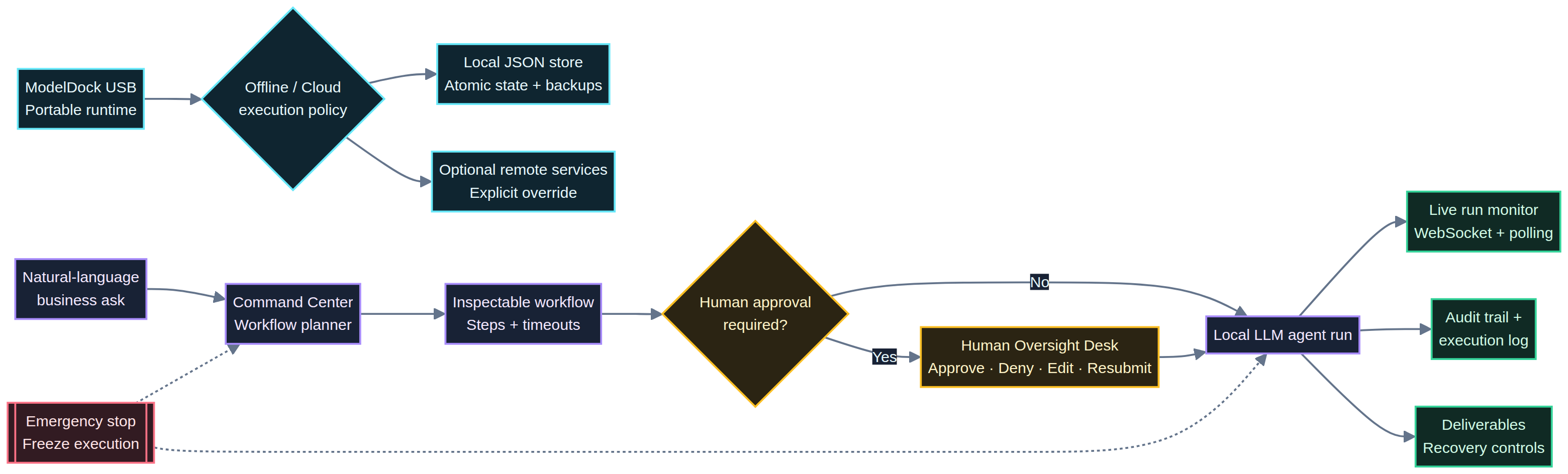
ModelDock makes the execution boundary visible. Offline mode restricts work to local-model execution and stores operational records in the USB-local JSON state file. Cloud mode is an explicit opt-in for deployments that provide the required remote services.
Offline mode is enforced in the launch path, not merely represented by a badge. Missing, invalid, or unreachable local-model configuration blocks the launch and explains what needs to be fixed.
Open User settings → Set up disconnected execution and configure a provider, model name, and either a USB-relative model path or a loopback endpoint such as http://127.0.0.1:11434.
Discovery provides platform-aware USB candidates for Windows, macOS, and Linux. The scanner is bounded and read-only: it does not execute files, follow symlinks, or modify discovered content. Supported formats include .gguf, .safetensors, .onnx, .bin, .pt, and .pth.
USB drive
  ├── portable/launch-windows.ps1   Windows launcher
  ├── portable/launch-unix.sh       macOS/Linux launcher
  ├── portable/start-runtime.mjs     startup, health check, shutdown
  ├── portable/select-node.mjs       bundled-runtime selection
  ├── portable/backup.mjs            export and restore helper
  ├── portable/secrets.mjs           encrypted local secret helper
  ├── portable-data/                 local JSON state and configuration
  └── portable-runtime/              runtime slots and verification metadata
The runtime defaults to the atomic local JSON store. A MySQL/TiDB path remains available as an explicit deployment override when a remote database is intentionally configured.
Natural-language request
          │
          ▼
 Command Center ──► Workflow planner ──► Approval gates ──► Agent run
          │                                  │                  │
          │                                  ├── Human review   │
          │                                  └── Audit trail    │
          │                                                     │
          ├──────── WebSocket + polling updates ────────────────┤
          ▼                                                     ▼
 Live run monitor + log tail                         Deliverables + recovery
          │
          └──────── Local JSON adapter or MySQL/TiDB override
                                │
                         USB portable runtime
The stack uses React, Tailwind CSS, Express, tRPC, Drizzle ORM, WebSockets, and Vitest. The local JSON adapter mirrors the application’s operational entities so agents, runs, approvals, logs, policies, workflows, deliverables, and workspace controls can persist without MySQL.
ModelDock is built around conservative defaults:
- Portable instances bind to loopback by default to reduce accidental LAN exposure.
- Secrets are not embedded in launchers or committed to the repository.
- The portable secrets helper uses encrypted storage driven by a host-provided passphrase.
- Sensitive workflow actions remain approval-gated and auditable.
- Emergency-stop state is retained through local persistence and backup operations.
- Imports create an automatic pre-restore snapshot before replacing active state.
- Repository rules exclude portable state, backups, logs, generated USB assemblies, and local secrets.
ModelDock is an operational platform, not a certification that every model, connector, workflow, or host environment is safe. Test with disposable data, review policies, verify native launchers on each target operating system, and keep encrypted backups.
client/          React dashboard and settings experience
server/          tRPC procedures, persistence, runtime services, and tests
drizzle/         MySQL/TiDB schema and migrations
portable/        Windows/macOS/Linux launchers and package tooling
portable-data/   USB-local configuration and runtime state
pnpm check
pnpm test
The tests cover workflow parsing, protected operations, local JSON persistence, backup validation, model readiness, health outcomes, platform-specific discovery, and read-only model-file scanning. Native PowerShell behavior and physical USB operation must still be verified on real Windows, macOS, and Linux hosts before a public release.
The next high-leverage improvements are connector sandboxing, signed release automation, endpoint-specific probes for common local runtimes, model checksum verification, backup history with retention controls, richer model metadata extraction, and guided first-run onboarding.
The goal is not to make an impressive demo. The goal is to make autonomous work repeatable, inspectable, portable, and recoverable.
Contributions are welcome when they improve operator control, reproducibility, security, accessibility, or cross-platform reliability. Include tests for behavior changes, never commit real credentials or state files, and document host-specific assumptions. For larger changes, describe the workflow, safety boundary, and validation plan in an issue or pull request.
ModelDock is released under the MIT License. See package.json for the repository license declaration.
ModelDock USB · Local models. Human oversight. Portable operations.